By RWT Robotics Editorial Team Checked against 8 sources Published
The Cozmo robot went on sale in October 2016 for $179.99. Ten years and two corporate collapses later, an original Cozmo still drives, plays and recognises faces, because it never relied on a cloud server. Its replacement, Cozmo 2.0, is listed on the official store at $399.99 and marked Sold Out, and Pennsylvania’s Attorney General says none of the prepaid orders were ever delivered.
Key takeaways
- An original Cozmo still works in 2026 with the free app, because it runs locally and needs no cloud.
- Cozmo 2.0 has never shipped. Don’t prepay for it, whatever the store page says.
- The battery is the part most likely to fail. Replacing it takes some patience but is doable.
- Vector is more independent but needs servers or the community wire-pod for voice. Cozmo is better for kids and coders.
- If you’d rather buy new, Sphero BOLT+ and Wonder Workshop’s Dash are supported coding robots at around $190 to $200.
Fact-checked
We checked these key facts against the sources named, on November 20, 2026:
- The Cozmo robot went on sale in October 2016 for $179.99 (source: prnewswire.com)
- Cozmo is a small tread-driven toy robot that Anki launched in 2016 (source: en.wikipedia.org)
- Anki’s April 2019 shutdown didn’t take Cozmo’s brain with it, which is why the robot still works (source: theverge.com)
- The robot hosts its own Wi-Fi network and your phone joins it, so it kept working after Anki shut down in 2019 (source: support.digitaldreamlabs.com)
Cozmo robot in 30 seconds: what it is and where things stand in 2026
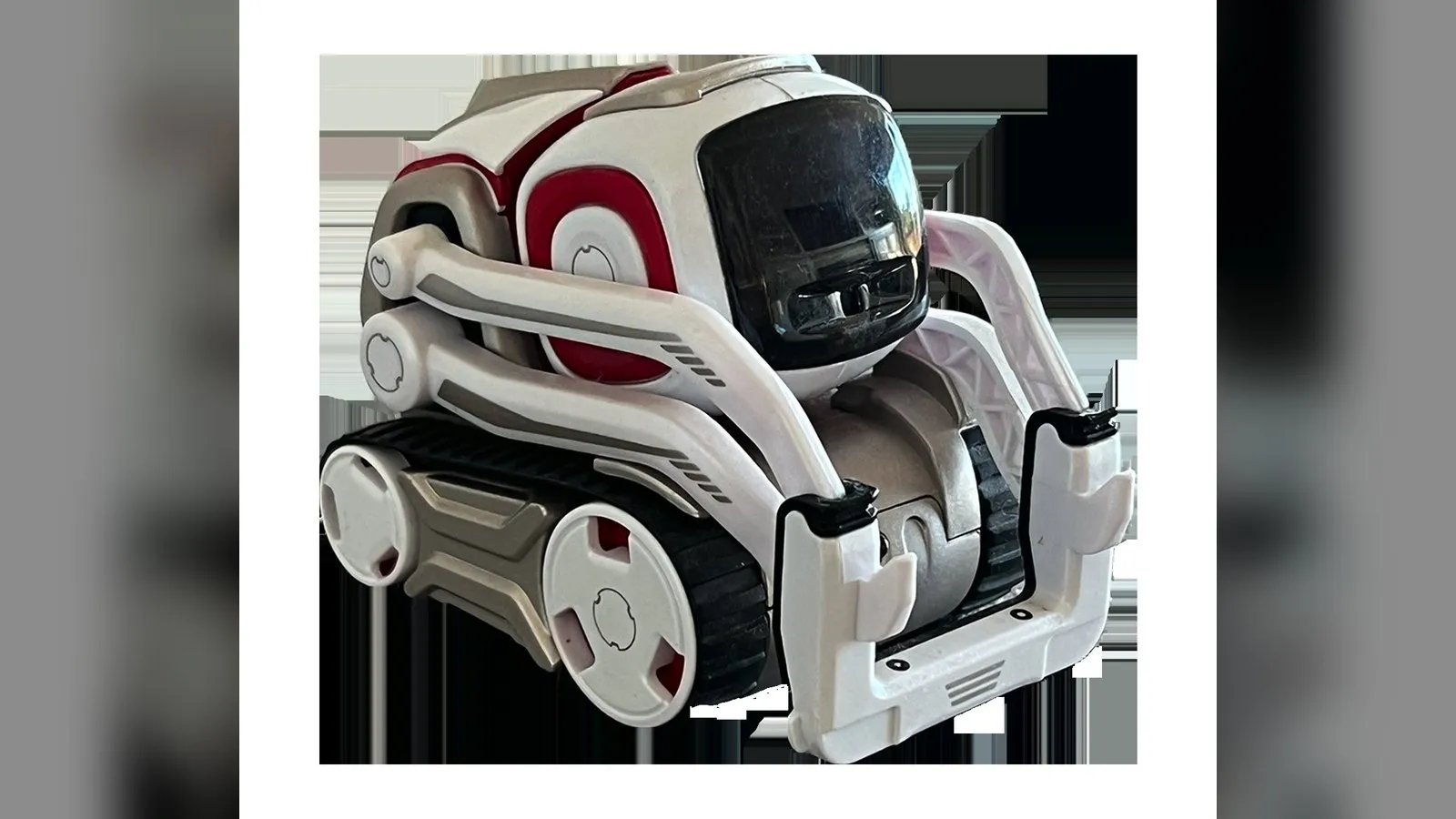
Cozmo is a palm-sized toy robot that moves on treads, lifts and stacks three light-up cubes, and shows emotions through animated eyes on a small screen. Its personality software runs in a phone app. The original is no longer made, so you’ll have to buy one used. Units in good condition still work fully offline in 2026.
The current Cozmo 2.0 listing on Anki’s store at anki.bot (“Cozmo 2.0 Educational Toy Robot, From $399.99”) is marked Sold Out. A lawsuit from the Pennsylvania Attorney General says the company took preorders from November 2020 to January 2024 and delivered no Cozmo 2.0 units.
The comparison with Vector comes down to who it’s for. Cozmo is the better pick for a child or a coding beginner who wants a dependable robot. Vector suits an adult who wants a robot that roams the desk by itself and doesn’t mind running a community voice server.
Verdict: the good, the bad and the bottom line
A used original Cozmo is still worth buying in 2026 if you get it at a fair price, with a return window and a plan for the battery. The good points are the design itself. The bad points come from its age and the way it was built.
The good
- Works fully offline. There are no servers to lose, so Anki’s 2019 shutdown didn’t affect it.
- Three Power Cubes, which make for more games than Vector’s single cube.
- Code Lab for beginners and a Python SDK for older students.
- Some of the best character animation on any consumer robot.
The bad
- The app has to stay in the foreground, so every session takes over a phone.
- About 1.5 hours of play per charge, measured by Mashable in 2016.
- Sold used only, so condition varies a lot.
- Batteries are now 7 to 10 years old and often worn out.
Bottom line: Buy a tested original for a child or a coding beginner, budget for a new battery, and never prepay for Cozmo 2.0.
What is the Cozmo robot?
Anki built Cozmo as a small consumer robot with a character. The hardware is modest. What made it stand out was the hand-authored animation, the computer vision and the behaviour software, all of it running on your phone.
What comes in the box
Anki’s launch package, as reported by TechXplore in 2016, held the robot, three Power Cubes and a charging station that Cozmo drives onto. The hardware breaks down like this:
| Component | What it does |
|---|---|
| Tread drive | Two motorised tracks for turning on the spot and climbing small bumps |
| Lift | A forklift-style arm that picks up, stacks and flips the cubes |
| Head and face | A tilting head with a small OLED screen showing animated eyes |
| Camera | A VGA camera in the face (Mashable and Trusted Reviews both list VGA, and Trusted Reviews gives 30 fps) |
| Power Cubes | Three cubes with LEDs, printed visual markers and tap sensing, each powered by a 1.5V N-cell battery |
| Charger | A drive-on dock that charges the robot’s internal lithium battery |
Mashable’s 2016 review measured about 1.5 hours of play per charge. Anki also sold a Collector’s Edition with a different finish. iFixit notes that the Collector’s Edition battery is soldered in, which makes it harder to swap.
How Cozmo’s “brain” works (phone app + robot Wi-Fi)
Cozmo creates its own Wi-Fi access point. Your phone or tablet joins that network, and the Cozmo app does the heavy work: vision processing, behaviour selection, game logic and speech. The robot handles the motors, sensors, display and camera stream. Nothing passes through Anki’s or anyone else’s servers.
Some third-party sites say Cozmo connects to the phone over Bluetooth. That’s wrong. Android Police’s 2017 review describes the Wi-Fi password appearing on Cozmo’s face during setup, and you join that hotspot like any other network.
This design cuts both ways. Anki’s April 2019 shutdown didn’t take Cozmo’s brain with it, which is why the robot still works. The downside is that Cozmo can do nothing without a phone. GearBrain confirmed after the shutdown that Cozmo only responds while the app is open and switches off when you change to another app.
Did you know?
Cozmo doesn’t use the cloud at all. The robot hosts its own Wi-Fi network and your phone joins it, so it kept working after Anki shut down in 2019. Vector’s voice features, by contrast, went down when Digital Dream Labs’ servers did.
From an engineer’s point of view, the “emotion engine” is a well-crafted behaviour system, not general intelligence. A set of internal mood variables raises or lowers the weight of each behaviour the robot could pick next. Those behaviours trigger animations drawn by hand by Anki’s animators. Vision picks out faces and the markers printed on the cubes. There’s no large language model, and no learning beyond saving the faces and names you teach it. The illusion works because the animation is excellent, not because the robot understands anything.
Games, face recognition and Code Lab
The app’s games use the cubes as controllers. Quick Tap is a reflex game, Keep Away pits your hand against the lift, and Memory Match uses the cube lights. Cozmo can learn faces, link them to names you type in, and say those names aloud.
Code Lab is a visual, block-based editor inside the app. Kids drag blocks to make Cozmo drive, talk, animate and react to cubes or faces. Advanced users can move up to the Python SDK, covered below.
From Anki to Digital Dream Labs and back: a Cozmo timeline
Cozmo outlived the company that built it, and the brand has changed owners and names since. The dates below come from public reporting and court filings, with the source for each row.
| Date | Event | Source |
|---|---|---|
| Oct 16, 2016 | Cozmo launches in the US at $179.99, and a free beta SDK follows that month | Wikipedia, TechXplore |
| Oct 2018 | Anki releases Vector at $249 | Axios, iFixit |
| Apr 2019 | Anki shuts down suddenly after a funding round falls through | IEEE Spectrum |
| Dec 2019 | Digital Dream Labs (Pittsburgh) buys Anki’s IP: patents, trademarks, data and domains for Cozmo, Vector and Overdrive, but not the physical inventory | The Robot Report |
| Nov 2020 | DDL opens Cozmo 2.0 preorders and promises shipping “as early as” May 15, 2021 | Geeky Gadgets |
| Sep 2024 | The Pennsylvania Attorney General sues DDL and CEO Jacob Hanchar | Pennsylvania Office of Attorney General press release |
| Early 2025 | Digital Dream Labs rebrands back to Anki | Wikipedia |
| Jul 2025 | The Cozmo iOS app, published by DDL, reaches version 3.6.7 | Apple App Store listing |
| Jul 10, 2026 | A Pittsburgh court reportedly appoints a receiver over DDL’s assets | Vector fan site report |
The original Anki, co-founded by Boris Sofman, also made Anki Overdrive, an app-controlled racing car set. DDL’s own projects included Vector 2.0 and a Rick and Morty Butter Robot. The Butter Robot appears next to Cozmo 2.0 in the Attorney General’s list of unfulfilled orders.
What happened to Cozmo 2.0?
Cozmo 2.0 was never delivered. Preorders opened in November 2020. The Pennsylvania Attorney General’s complaint says no Cozmo 2.0 orders were fulfilled, and the official store still shows it as Sold Out at $399.99.
The promised upgrades
The 2020 announcement promised real hardware improvements over the 2016 robot:
| Feature | Cozmo (2016) | Cozmo 2.0 (promised 2020) | Vector (2018) |
|---|---|---|---|
| Launch price | $179.99 | Store listing from $399.99 | $249 |
| Status | Discontinued, works offline | Never delivered | Discontinued, cloud-dependent voice |
| Display | Small OLED eyes | Full-colour display | Colour display |
| Camera | VGA | 2MP | HD wide-angle |
| Battery | About 1.5 hours of play (Mashable) | 30% more battery life claimed | Docks itself to recharge |
| Sensors | Camera, cube markers | Four proximity sensors added | Camera, microphone array, distance sensor |
| Cubes | Three Power Cubes | Not confirmed | One cube |
| Needs a phone running | Yes, app in foreground | Not confirmed | Only for setup |
No independent reviewer ever checked any of the 2.0 claims, because no unit reached a customer.
Reality check
Every Cozmo 2.0 spec is a marketing promise from 2020. No reviewer or customer has ever had a unit to measure.
The Pennsylvania lawsuit and the 2026 receivership
According to the Pennsylvania Attorney General’s office, Digital Dream Labs took about 14,000 prepaid orders between November 2020 and January 2024. Customers paid between $147 and $655 per robot, more than $4 million in total. The complaint names the company and CEO Jacob Hanchar and says none of the Cozmo 2.0 or Butter Robot orders were fulfilled. That is the official account.
Since then the picture has been less clear. A Vector fan site, which is a community source with a solid record of tracking DDL, reports that the Allegheny County Court of Common Pleas appointed attorney John J. Richardson of Bernstein Burkley as receiver over DDL’s assets, effective July 10, 2026. The same site says no judgment or settlement in the AG case is on the public record. Treat these details as reported until you have checked the court docket yourself.
Did you know?
According to the Pennsylvania Attorney General’s complaint, none of the roughly 14,000 prepaid orders taken between November 2020 and January 2024 for Cozmo 2.0 or the Butter Robot was fulfilled.
If you paid for a Cozmo 2.0
If you preordered Cozmo 2.0 and never received it, take these steps in order:
- File a complaint with the Pennsylvania Attorney General’s Bureau of Consumer Protection, wherever you live. Use the office’s online consumer complaint form and include your order number, date and amount.
- Ask your card issuer about a chargeback. Most issuers have time limits, so older orders may be refused, but asking costs you nothing.
- Keep every email, receipt and order-status screenshot.
- Watch for notices from the receiver about a claims process.
Some buyers have been offered a Vector in exchange for waiving a refund claim. Be careful with that trade. You would give up a legal claim for a robot whose voice features depend on servers that are now reportedly under a receiver. Read exactly what you’d be waiving, and ask the AG’s office before you sign anything.
Engineer's note
Don’t prepay for Cozmo 2.0, whatever the product page says. If you want a Cozmo now, buy an original on the used market from a seller who offers a return window.
How much does a Cozmo robot cost in 2026?
In 2026 the only working Cozmo you can buy is a used original, priced by condition and by whether it comes complete. The only new listing is Cozmo 2.0 at $399.99, and it is Sold Out and has never been delivered. Budget for a battery and cube cells on top of the purchase price.
| Option | Price | Availability | Risk |
|---|---|---|---|
| Original Cozmo, used | Varies with condition and whether all three cubes and the charger are included | eBay, local listings, refurbishers | Worn battery, missing cubes |
| Cozmo Collector’s Edition, used | Usually more than the standard model | Rare | Soldered battery makes repair harder |
| Cozmo 2.0 (anki.bot) | From $399.99 | Sold Out | Never delivered, per the PA AG |
| Original 2016 retail | $179.99 MSRP | Discontinued after April 2019 | None on sale new |
The extra costs are easy to predict. Expect to replace the robot’s internal battery at some point. Each Power Cube needs a 1.5V N-cell battery, which Mashable said lasts about a year. You may also want an older phone or tablet set aside as Cozmo’s dedicated controller.
Buying a used Cozmo: 8-point checklist
- Put Cozmo on the charger. The light should turn solid green once he’s fully charged. Anki’s support FAQ links a missing solid green light to a failing battery.
- Run him off the charger for at least 20 minutes. A robot that dies after a few minutes needs a new battery.
- Check that all three Power Cubes are included, light up and pair with the robot.
- Look at the face display for dead lines, dim patches or flicker.
- Raise and lower the lift several times. It should move smoothly, without clicking or sagging.
- Drive forward, backward and in turns, and check that both treads grip.
- Confirm the charger is the original drive-on dock and its contacts aren’t damaged.
- Get a return window in writing, ideally 14 days or more.
When a seller says it works
Ask for a short video showing Cozmo leaving the charger, lifting a cube and showing his eyes. A photo of a robot sitting on its dock tells you nothing about the battery.
Is Cozmo still working?
Yes. The Cozmo app is still on the Apple App Store and Google Play, published by Digital Dream Labs (version 3.6.7 on iOS as of July 2025). The robot needs no internet connection. All the games, face recognition and Code Lab run on the phone. What fails now is the hardware, mostly batteries, along with some connection problems on newer iPhones.
Remember the foreground rule. Cozmo shuts down as soon as you leave the app, so tapping a notification or switching quickly to Messages ends the session. That’s how Cozmo was designed, not a fault.
Fixing “Cozmo won’t connect”
The most common complaint on iOS is “Cozmo app not connecting with the wifi, it always says I need to connect to Cozmo.” The phone joins Cozmo’s hotspot, sees no internet, and quietly switches back to cellular or your home network.
Quick steps: fix a Cozmo connection loop
- Charge Cozmo fully, then lift and lower him to wake the face.
- Turn off cellular data on the phone.
- Forget your home Wi-Fi network for now.
- Join the Cozmo network using the password shown on his face.
- Open the app and keep it in the foreground.
- If it still loops, try an older iPad or an Android device.
The older-device route has worked for some owners. One r/Cozmo user reported that Cozmo connected from a first-generation iPad Pro after a newer iPhone failed. Treat that as a community workaround, not an official fix.
If Cozmo connects and then drops, or “keeps turning off,” Anki’s support FAQ points to the battery. If the cubes won’t connect, replace their N-cells first, because weak cube batteries cause most pairing failures.
Replacing Cozmo’s battery
You can replace the battery yourself. iFixit’s Anki Cozmo Battery Replacement guide covers the full teardown. You’ll need a JIS #1 screwdriver for the screws in the red wheels, and then you pry off the bumper and head panels. Commenters suggest raising the arm to its highest point before the lift step. The Collector’s Edition needs soldering.
Some owners report that after a battery swap, the charger and the robot flash continuously. Two common causes are a connector that isn’t fully seated and a replacement cell that won’t take a charge. The iFixit comments say lining up the tiny connectors during reassembly is the hardest part. Open him up again and reseat every connector before you blame the new battery.
Keep spares
Keep a spare N-cell for each Power Cube. They’re less common than AAA, and one weak cube can make a whole game look broken.
Cozmo vs Vector: which is better?
Cozmo is better for kids, families and anyone who wants to program a robot. Vector is better for adults who want a desk companion that acts on its own. That independence now depends on servers in a way Cozmo doesn’t.
| Factor | Cozmo | Vector |
|---|---|---|
| Runs without a phone | No | Yes, after setup |
| Processing | Done on the phone | Onboard quad-core Qualcomm Snapdragon, about 50x Cozmo’s processing power (StemGeek) |
| Cubes | Three | One |
| Charging | You put him back on the dock | Docks himself |
| Voice commands | None | Yes, through the cloud or wire-pod |
| Server dependence | None | High for voice |
| Games and coding | Many games, Code Lab, Python SDK | Fewer games, Python SDK |
Vector’s onboard chip shows when a robot needs a multicore processor: running vision, audio and behaviour at the same time with no phone attached. That independence is fragile, though. iFixit notes that DDL’s Vector servers were down as of January 2024, and many owners now run wire-pod, a self-hosted community server that handles voice recognition. A fan site reported the cloud endpoints were responding again in August 2026, but with a receiver now in charge, that could change at any time.
Choose by who will use it:
- Child aged about 8 to 12, or a coding beginner: Cozmo. More games, three cubes, Code Lab, and nothing that depends on a server.
- Adult who wants a hands-off desk pet: Vector, if you’re happy to set up wire-pod on a spare computer or a Raspberry Pi-class device.
- Python learner: Either one. Cozmo has the bigger ecosystem of community libraries.
The case against Cozmo is fair. Because the app must stay in the foreground, a phone is tied up for every session, and a 1.5-hour battery is short. If you want a robot that lives on a shelf and comes alive on its own, Cozmo will feel limited.
Programming Cozmo: SDK, Code Lab and pycozmo
There are three ways to program Cozmo: Code Lab in the app for beginners, the official Python Cozmo SDK, and pycozmo, an independent library that talks to the robot directly. All three still work in 2026, each with different limits.
| Tool | Language | Status | Python requirement | Limits |
|---|---|---|---|---|
| Code Lab | Visual blocks | In the current app | None | Only what the blocks expose |
| Cozmo SDK | Python 3 | Final PyPI release 1.4.9 | 3.5.1 or later | Needs a phone running the app in SDK mode, connected by USB |
| pycozmo | Python 3 | 0.8.0 (November 2020), MIT licence, not affiliated with Anki or DDL | 3.6.0 or later | No personality engine or app behaviours |
Anki’s decision to release a free SDK at launch turned a $180 toy into a teaching and research platform. Universities used it in robotics courses. At Carnegie Mellon, David Touretzky’s group built its cozmo-tools teaching framework on top of the SDK. The SDK also exposes useful data such as the robot’s pose estimate, a simple form of robot odometry that you can log and plot.
The official Cozmo SDK
With the official SDK, your computer sends commands to the robot through the phone. Install it, then run the classic first program:
pip install cozmo==1.4.9
import cozmo

def cozmo_program(robot: cozmo.robot.Robot):
    robot.say_text("Hello World").wait_for_completed()

cozmo.run_program(cozmo_program)
The PyPI page for 1.4.9 lists Python 3.5.1 or later, but the SDK hasn’t been updated in years. Newer interpreters can throw errors, so install it in a virtual environment with an older Python 3 release.
pycozmo: no phone required
pycozmo skips the phone. Your computer joins Cozmo’s Wi-Fi network and speaks the robot’s protocol directly. Version 0.8.0 needs Python 3.6.0 or newer and pulls in Pillow, FlatBuffers and dpkt as dependencies.
pip install pycozmo
import time import pycozmo with pycozmo.connect() as cli:
    cli.set_head_angle(angle=0.6)
    time.sleep(1)
The trade-off is significant. pycozmo gives you the motors, camera, display and sensors, but not Cozmo’s personality. The mood system, the animations chosen by behaviour and the games all live in the app, so a pycozmo Cozmo is a capable small mobile robot without the character.
Engineer's note
Your computer can’t stay on your home network while it’s joined to Cozmo’s hotspot. Install pycozmo and its dependencies first, then switch Wi-Fi networks.
Alternatives if you can’t find a Cozmo
If the used Cozmos you can find are overpriced or worn out, choose the alternative by what you want the robot for. For personality, look at Vector or EMO. For coding, Sphero BOLT+ and Wonder Workshop’s Dash are both still sold new with supported apps. The table weighs each one on price, how much it depends on its maker, coding depth and how it compares with Cozmo.
| Robot | Price (2026) | Best for | Coding | Trade-off vs Cozmo |
|---|---|---|---|---|
| Vector (Anki/DDL) | Used only | Adults who want an autonomous desk pet | Python SDK | More independent, but voice needs DDL servers or wire-pod |
| EMO (Living AI) | $279 standard edition | A desk companion with personality | No Code Lab-style teaching tools | Sold new, but no cube games and little coding |
| Sphero BOLT+ | About $199 at US retailers | Classroom-style coding, ages roughly 8 and up | Sphero Edu app: blocks and text coding | Strong, supported curriculum, but a rolling ball with no face recognition or character |
| Wonder Workshop Dash | $189.99 MSRP | Younger kids starting with block coding | Wonder and Blockly apps | Sold new with an active maker, but much less expressive than Cozmo |
Wonder Workshop raised Dash’s list price from $179.99 to $189.99 on October 9, 2025, citing tariffs on imports from the Philippines. Sphero sells BOLT+ on its own site mainly in classroom packs (a 15-robot Power Pack is $3,499), while single robots go for about $199 at US retailers.
For teaching code over the long term, BOLT+ and Dash are the safer bets, because their makers still ship apps and lesson plans. Neither comes close to Cozmo’s animation. A child who wants a robot friend will be happier with a used Cozmo. A child who wants to learn programming in a structured way, with lessons a teacher can follow, is better served by Sphero or Wonder Workshop.
FAQ
What is the Cozmo robot?
Cozmo is a small tread-driven toy robot that Anki launched in 2016. It has a lift arm, an OLED face, a VGA camera and three Power Cubes. A phone app runs its personality, games and face recognition.
How much does a Cozmo robot cost?
It launched at $179.99. Today you can only buy one used, and the price depends on condition and on whether the cubes and charger are included. The Cozmo 2.0 listing at $399.99 is Sold Out and has never shipped.
Is Cozmo still working?
Yes. The app is still available and Cozmo needs no servers. Most problems now come from worn batteries and connection issues on newer iPhones.
Will Cozmo keep working now that Anki is gone?
Yes, as long as a compatible app runs on a phone you own. The risk is the app disappearing from the app stores, so keep an older device that already has it installed.
Does Cozmo need Wi-Fi or the internet?
It uses Wi-Fi but not the internet. Cozmo creates its own network, and your phone connects to it directly.
Can Cozmo work without the app?
No. Unless the app is running in the foreground, Cozmo does nothing. The pycozmo library can control him from a computer, but without his personality.
Which is better, Cozmo or Vector?
Cozmo for kids and coders, because it works reliably offline and has more games. Vector for adults who want an autonomous companion and can run wire-pod.
Did Cozmo 2.0 ever come out?
No. According to the Pennsylvania Attorney General, none of the Cozmo 2.0 preorders taken from November 2020 onward were delivered.
I preordered Cozmo 2.0 and never got it. Can I get a refund?
File a complaint with the Pennsylvania AG, ask your card issuer about a chargeback, and watch for notices from the receiver. A refund isn’t guaranteed.
Why does Cozmo keep turning off?
Usually because of the battery. Anki’s support FAQ says frequent disconnects, or no solid green light on the charger, point to a battery replacement. Switching away from the app also turns him off.
Can you replace Cozmo’s battery?
Yes. iFixit has a step-by-step guide. The standard model needs only basic tools. The Collector’s Edition needs soldering.
Which Python version works with Cozmo?
The official SDK 1.4.9 lists Python 3.5.1 or later but is easiest to run on an older Python 3 release in a virtual environment. pycozmo 0.8.0 needs Python 3.6.0 or newer.
Is Cozmo good for kids learning to code?
Very good. Code Lab teaches block-based logic with instant physical feedback, and the Python SDK gives older students a real API to grow into. If you want a robot sold new with a supported curriculum, look at Sphero BOLT+ or Dash instead.
Where can I buy a Cozmo robot in 2026?
Used, from marketplaces and refurbishers, with a return window. Avoid any preorder or “coming soon” Cozmo 2.0 offer.
A healthy original Cozmo with a fresh battery and four spare N-cells is one of the cheapest ways to put a characterful, programmable robot on a kitchen table in 2026. Buy the hardware that exists, test it before the return window closes, and keep a dedicated older phone or tablet so the app outlasts whatever happens to the company next.
Keep reading
 Industrial & Service RobotsHow a Robotic Arm Works From Six Axis Designs to Simple ManipulatorsThe parts for Hugging Face's open-source SO-101 robotic arm cost about $130. A Universal Robots UR7e cobot lists…Nov 15, 2026 · 32 min read
 Industrial & Service RobotsWhat Is Robotics and How Do Robots Actually WorkRobotics is the engineering discipline that designs, builds and programs machines that sense their surroundings, decide what to…Oct 25, 2026 · 12 min read
 Industrial & Service RobotsCartesian robots and XYZ gantry systems explainedCartesian systems are robots that move a tool along three straight, perpendicular axes (X, Y and Z), so…Oct 21, 2026 · 4 min read
Credits and sources
By RWT Robotics Editorial Team
- Facts were checked against the sources below before publication.
- Published
Checking and sources
- Researched from 8 sources, listed below.
- Facts are checked against those sources; anything we cannot confirm is corrected, labelled or removed.
Sources (8)
- Cozmo – Wikipedia (en.wikipedia.org)
- Cozmo SDK and launch details – TechXplore (techxplore.com)
- Consumer Robotics Company Anki Abruptly Shuts Down – IEEE Spectrum (spectrum.ieee.org)
- Anki assets acquired by Digital Dream Labs – The Robot Report (therobotreport.com)
- Cozmo the friendly robot returns – Geeky Gadgets (geeky-gadgets.com)
- Pennsylvania Attorney General lawsuit against Digital Dream Labs (attorneygeneral.gov)
- Anki (American company) – Wikipedia (en.wikipedia.org)
- Anki store – all products (anki.bot)